
Skip to content
AI Creator Lab services

Your AI Creator. Your Ad Pipeline.

AI Creator Lab is an open-source studio for making short vertical UGC ads with a consistent AI creator character.

I install it, connect it to your accounts, and make your first ad with you.

Built by Digital Spirit Technology. Setup is $750. Free 30-minute discovery call.

Who this is for

A small team with a product to sell

You are a founder or a small team selling a physical product. You want a steady flow of short vertical ads without an agency retainer or a creator roster.

You already use ComfyUI and want a workflow that connects the brief, character, script and edit.

Or you have tried hosted AI ad tools and want to own the pipeline and understand the costs.

The workflow

From a product brief to a finished ad

I walk you through the whole sequence. These are screenshots from my demo recording, using an invented product and AI creator. They are not client work.

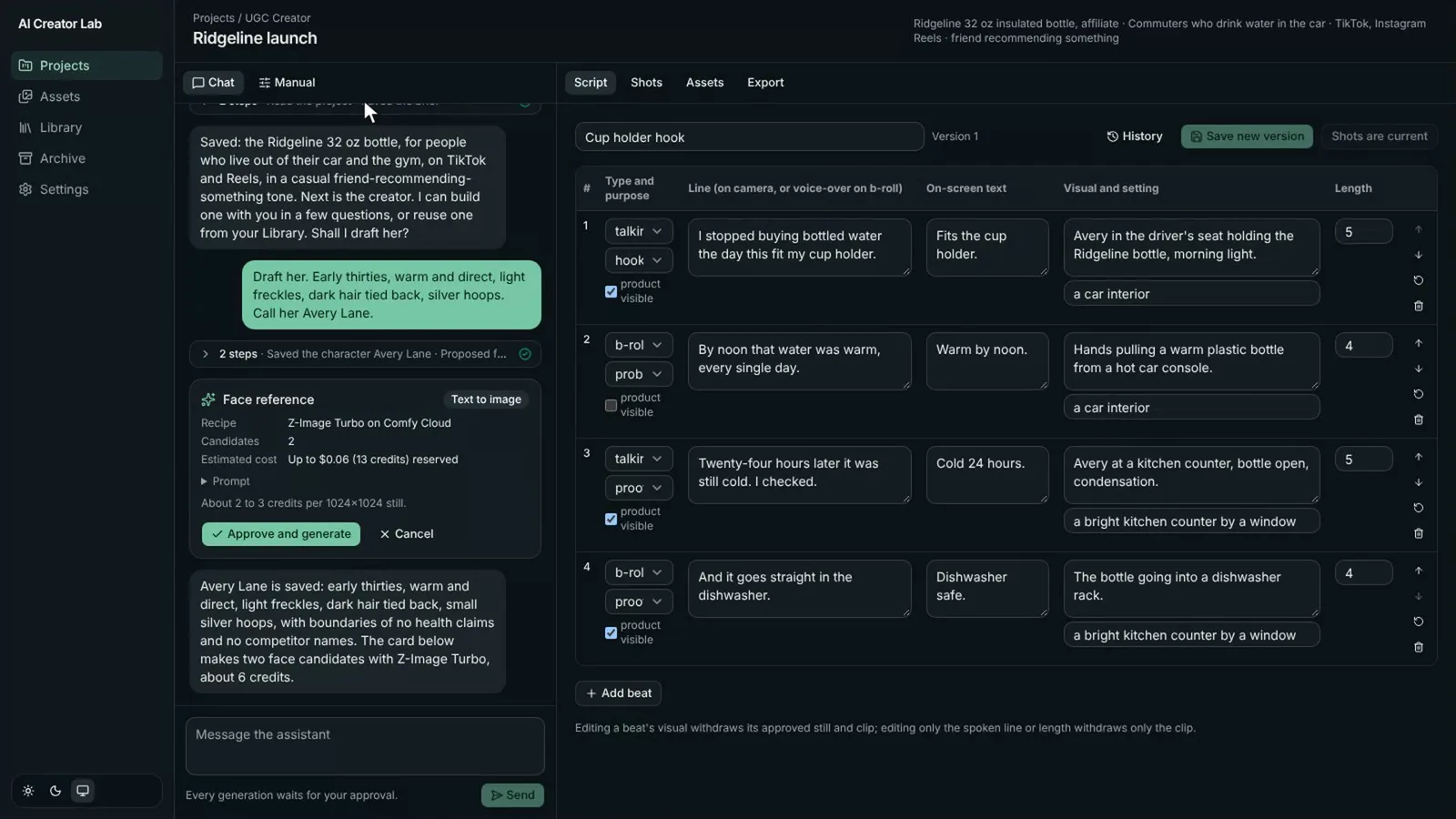
  1. AI Creator Lab demo project with a product brief and assistant conversation.
    01

    Brief

    Tell the assistant what you are selling. Build a product card with the claims your ad may make.

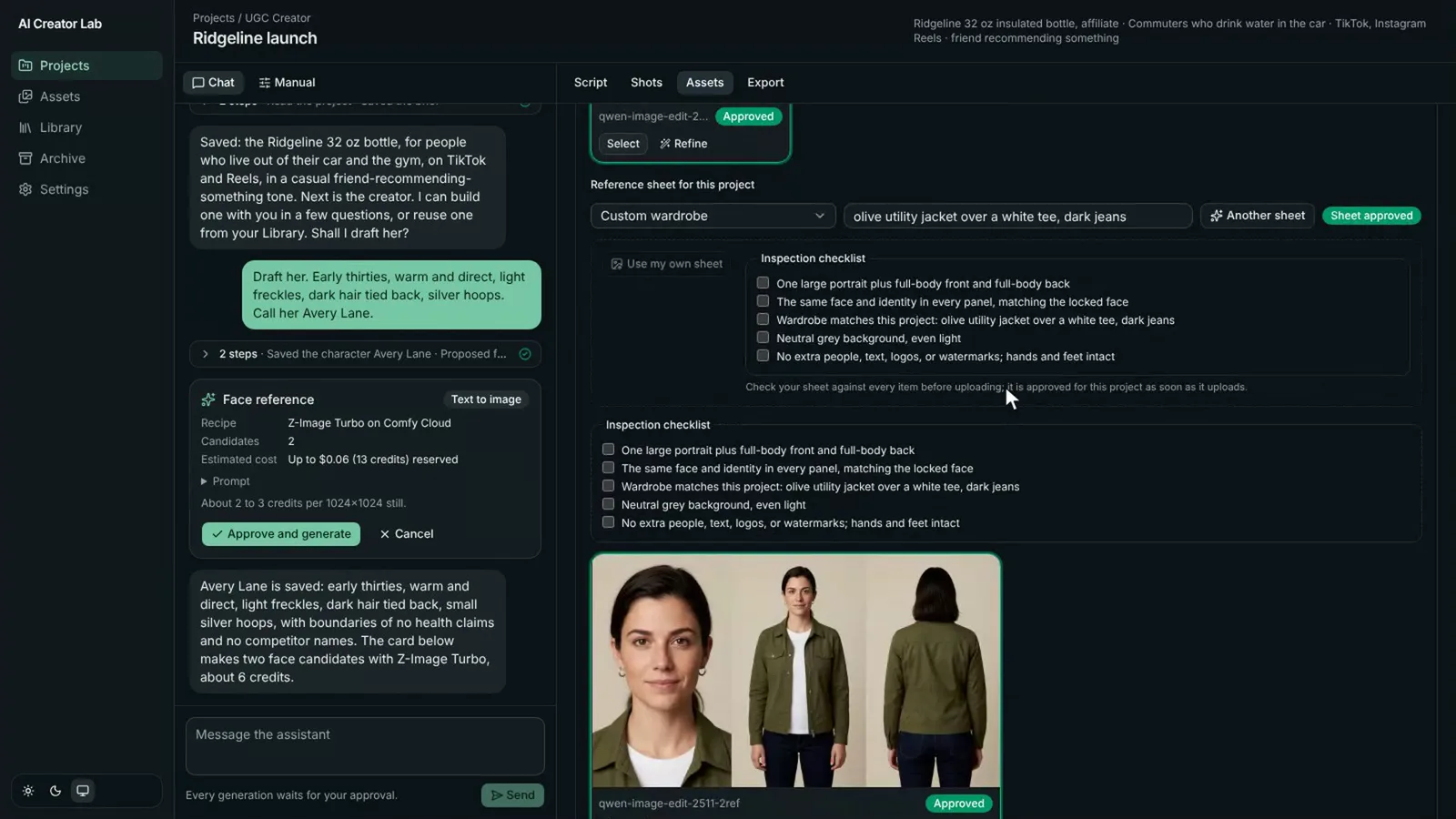
  2. Creator reference sheet with face, front and back views of the same demo character.
    02

    Character

    Lock the creator's face, body and reference sheet so each shot starts from the same character.

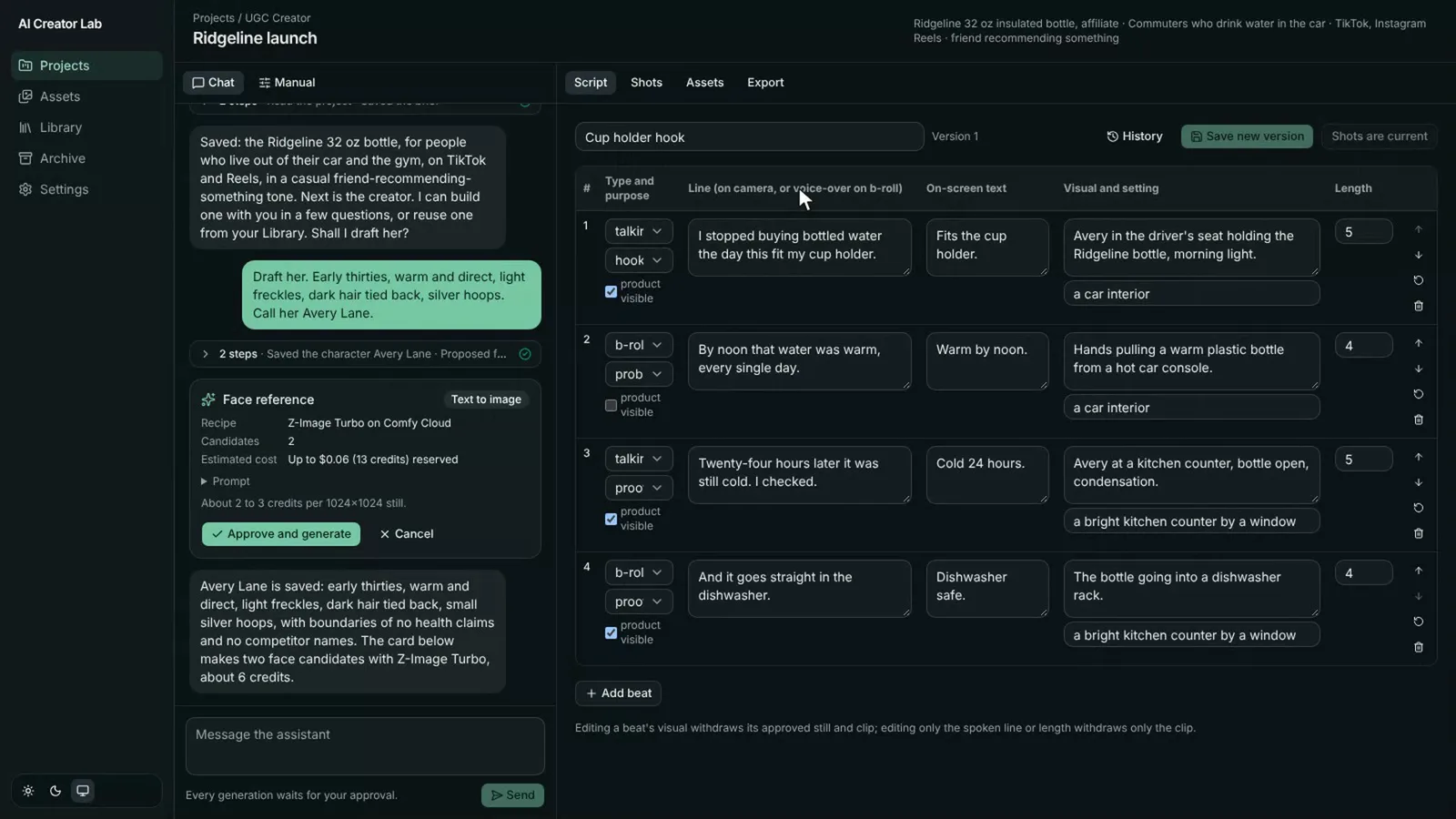
  3. Versioned script table with talking and b-roll beats, dialogue and shot descriptions.
    03

    Script

    Review a versioned script with talking beats, b-roll, dialogue and a plan for each shot.

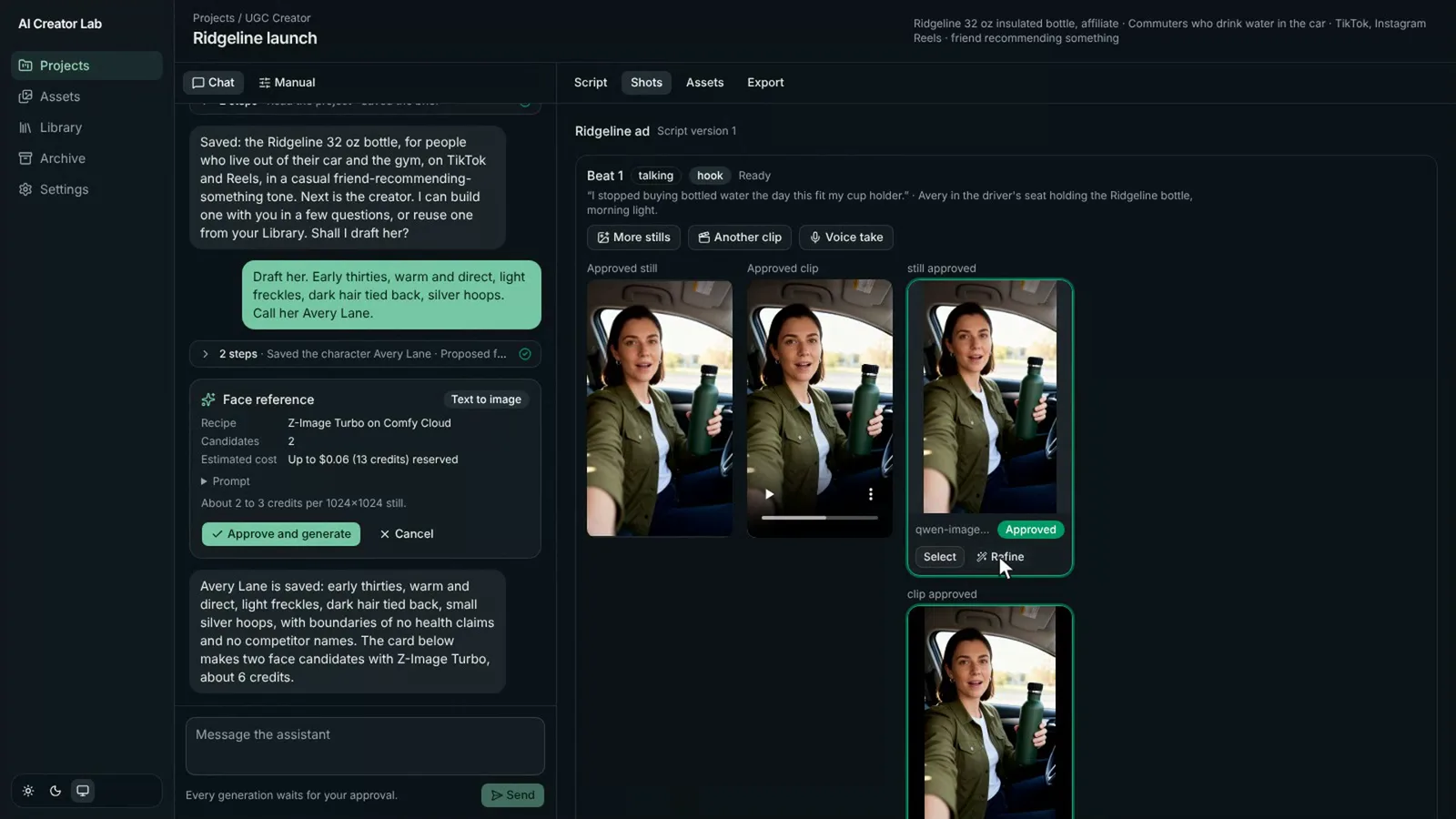
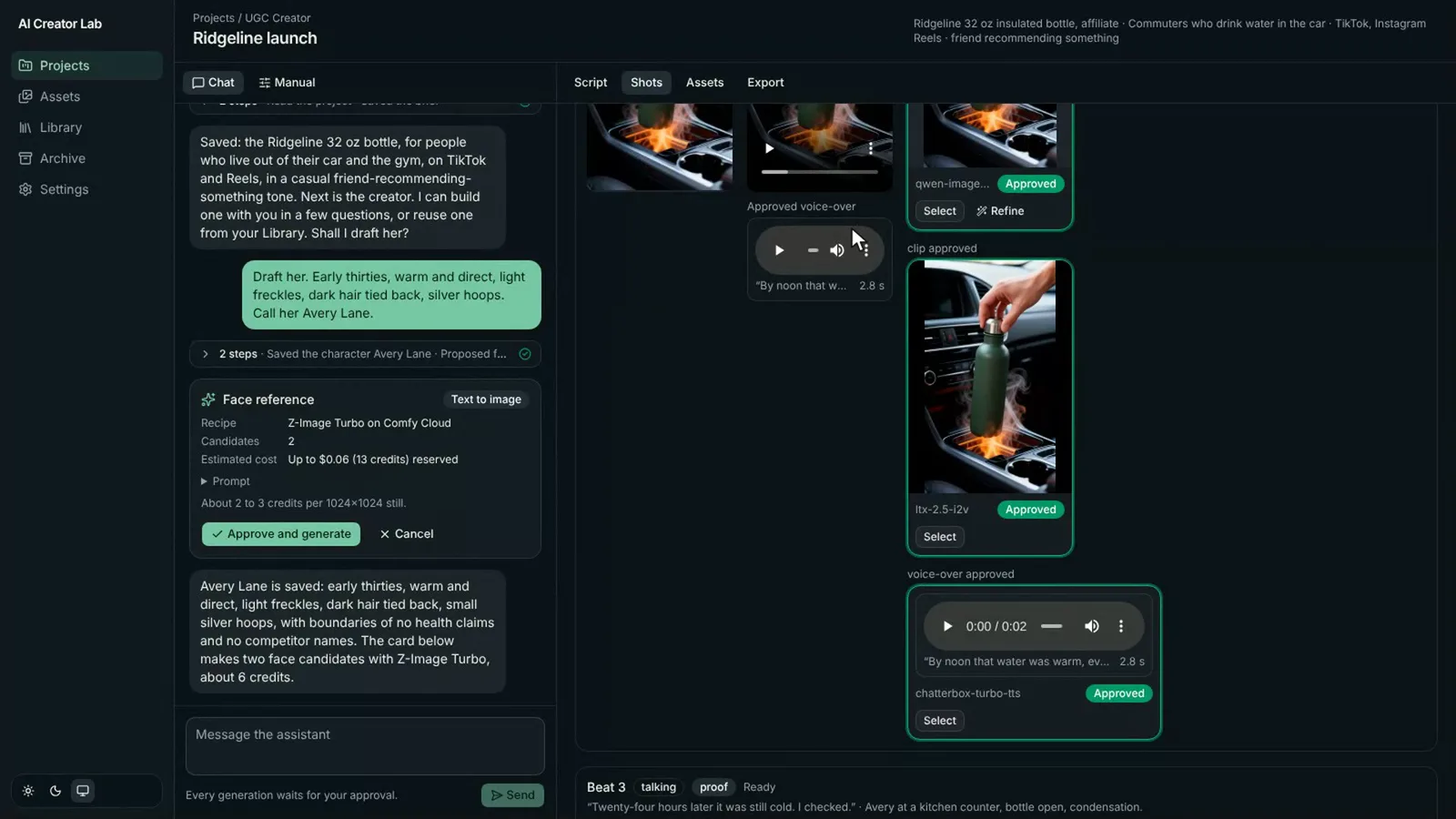
  4. Shot workspace with approved stills and vertical clips of the demo creator holding a bottle.
    04

    Shots and clips

    Compose a still for each beat, then generate and review the clips that belong in your ad.

  5. Approved voice-over audio players beside the demo ad's generated shots.
    05

    Voice-over

    Read the script in the creator's cloned voice, using a voice you have permission to use.

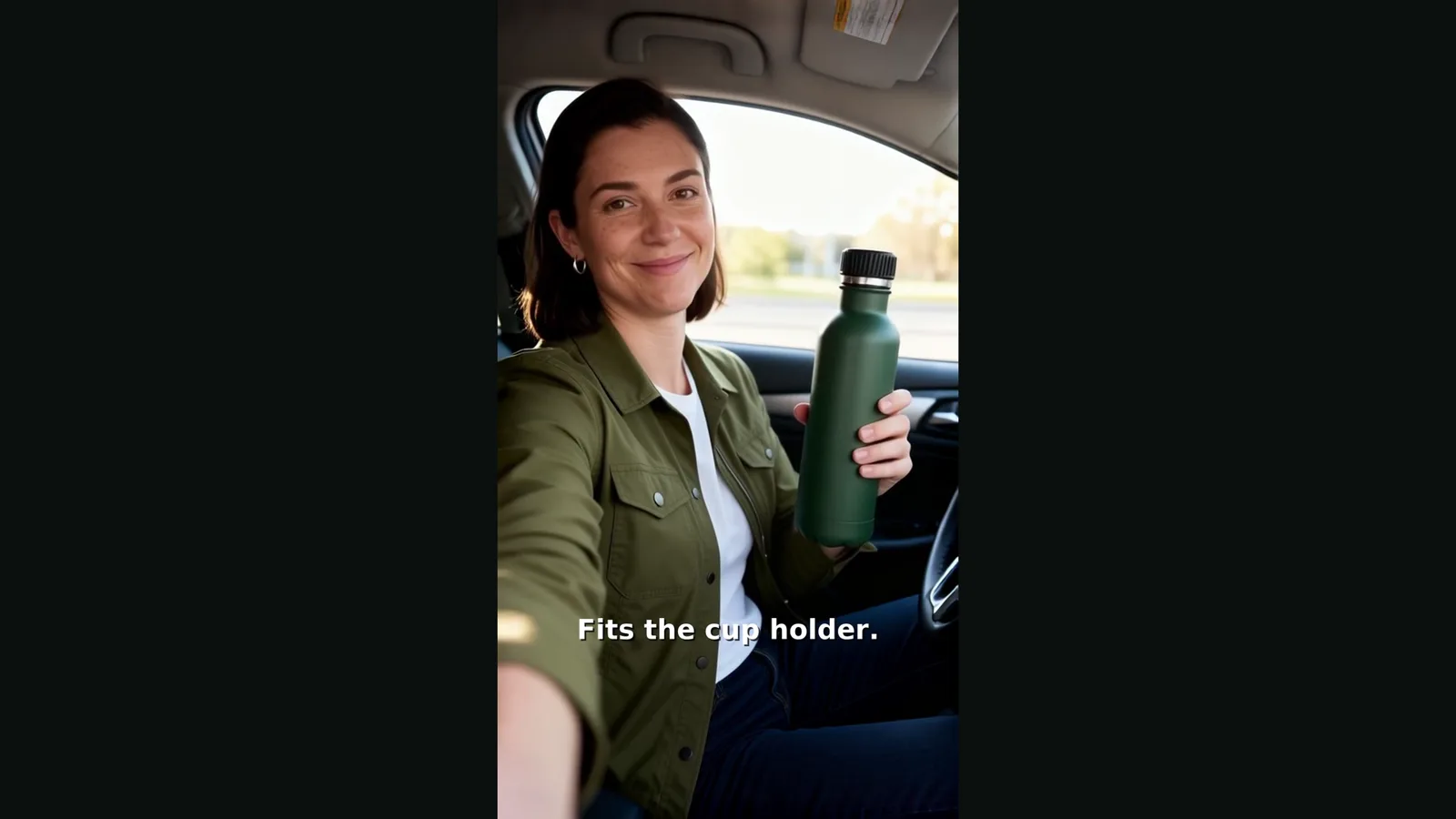
  6. Finished vertical demo ad with a creator holding a bottle and a caption on screen.
    06

    Export

    Assemble the selected takes into a finished 1080 × 1920 MP4 with captions.

You approve the generation

Each generation starts as a proposal with its recipe, prompt and cost estimate. I leave optional auto-approve off. Your allowance stops generation when the quoted or reserved cost would exceed it. It does not cap separate Anthropic charges.

You choose the models

The app ships 23 open-weights workflows across Z-Image, Qwen Image Edit, FLUX.2 dev, LTX 2.5, Wan 2.2, MiniMax H3, Chatterbox, Qwen3-TTS and Wan S2V lip sync. Settings lists Comfy Router's hosted models, including Kling, Seedance, Nano Banana, FLUX, Gemini and OpenAI image families.

The cost to run it

Your accounts. Direct provider bills.

AI Creator Lab runs on your computer or server and generates through your own Comfy account. You pay Comfy for generation and Anthropic for the assistant directly. There is no middleman or per-seat platform fee.

For the bundled Comfy Cloud workflows, budget for an eligible paid plan with API access plus generation usage. Standard is $20/month as checked October 29, 2026.

Direct calls to supported models through Comfy Router use credits without a subscription. That is a separate route from running a Cloud workflow, including one with hosted Partner Nodes.

During Setup, I check your selected models, recipes and account access before we generate.

Observed in October 2026

About 60 credits

My October 26 test produced a 15-second, three-beat ad with about 60 credits of open-weights generation. That was about $0.29 at the entry Comfy Cloud plan's reference rate.

That is one observed run, not a quote for every ad. It excludes the plan commitment, assistant usage, retries, premium models and my service. Voice-over and lip sync were verified separately and are not included in that total.

Hosted models can cost more per clip. Check Comfy's current pricing for the plan and generation route you choose.

Work with me

Choose how much help you need

The discovery call is free and takes 30 minutes. We decide what fits before you pay for any service.

Setup

$750

Fixed price

A working installation and your first complete ad, together.

Included

  • Install on your Mac, PC or a server you own.
  • Install the right FFmpeg build.
  • Connect your Comfy and Anthropic keys and set the spending allowance.
  • Screen-share walkthrough from brief to a finished ad.

Scope limits

Custom workflows, brand customization, ongoing support and provider charges are separate.

Customize

From $2,500

Fixed scope, quoted after discovery

Setup, plus the parts of the pipeline your brand needs.

Included

  • Everything in Setup.
  • Brand claims, tone and boundaries built into prompts.
  • Your ComfyUI workflows or preferred hosted models wired into recipes.
  • Scoped Router adapters, export presets or caption styling.
  • An MCP connection to Claude Code or Claude Desktop.

Scope limits

The written quote defines which custom work is included. Ongoing support and provider charges are separate.

Managed

$750 / month

Setup required first

A private instance, kept updated, with help each month.

Included

  • One private server instance behind a login layer.
  • App updates and three support or ad-production hours each month.
  • Help using the workflow and producing your ads.
  • Cancel before the next renewal.

Scope limits

Setup is $750 separately. Comfy and Anthropic usage is separate. This is not unlimited production or support.

Why work with me

I built the tool and its workflows

I'm Ted Darling, the founder of Digital Spirit Technology. I have spent more than 25 years doing full-stack work, with recent years focused on AI agent systems, Comfy pipelines and local inference.

I know where this setup gets stuck: lean FFmpeg builds, Router concurrency limits and Cloud plan tiers. I can work through those details with you.

The Setup call ends with a finished ad. We work through your product, your character and your accounts together.

The app also exposes its tools as an MCP server. If you want Claude Code or Claude Desktop to drive it, I can connect that in Customize. Spend-capable tools need permission, and the generation allowance still applies.

Honest notes

This is early software

One user, one machine, one content type: ads. I produced the first full ad on real credits on October 26, 2026. This is a working tool with a short track record.

The source is open under the MIT license. You own your installation and can take your project data elsewhere at any time. Model licenses, source media and likeness permissions still apply.

I do not guarantee ad performance. Generation quality depends on the models you choose and the references you provide. You review the claims, media and finished ad before you use it.

A few practical questions

Before we start

Do I need a Comfy plan or just credits?

It depends on how the job runs, not just the model's name. The bundled Comfy Cloud workflows need an eligible paid plan with API access plus credits. Hosted Partner Nodes inside those workflows still follow Cloud access requirements. Direct calls to supported models through Comfy Router use credits without a subscription. That does not make every recipe in the app credits-only. I check your chosen route and account during Setup.

Can it use my own ComfyUI workflows?

Yes. In Customize, I can wire your workflows into recipes with the inputs and outputs the app expects. Comfy API deployments require Standard or another paid plan. Importing your own model weights into Comfy Cloud requires Creator or above, but that does not mean every custom workflow needs Creator. We agree on the workflows, account requirements and adapters in the written scope.

Does it run on Windows?

Windows installation is documented. I check your machine, runtime and FFmpeg build during Setup. I do not claim it has been tested on every Windows configuration.

Can it run on a server?

Yes. The app binds to the local machine and does not include a built-in login. A server installation needs an SSH tunnel or an authenticated reverse proxy. Managed includes that private access layer for one instance.

What about my own photos as the creator?

We can use your own reference photos to establish the character. You need permission to use the person's likeness and any voice samples. I cannot promise that every model will preserve a likeness equally well.

Is my data sent anywhere besides Comfy and Anthropic?

It can be. Prompts, reference media and voice samples go to the services needed for the chosen generation, including model providers behind Comfy Router. The assistant uses Anthropic. Managed also stores the app's data on your private host, and an optional MCP client handles the data you give it. We review the route before connecting your accounts.

Can I cancel Managed?

Yes. Cancel before the next renewal. You keep the app and your project data and can move the instance elsewhere. Provider accounts and their charges remain yours.

Start with a conversation

Let's make your first ad

Tell me what you sell, where you want to run the app and what you want to make. I'll help you choose a scope and account setup that fit.

30 minutes. No payment required to book.

Let's plan your first ad

Tell me what you sell and where you need help. I'll reply with a recommended setup option and next steps.

For example: I sell reusable water bottles and need help making my first product ad.

No payment required to ask. Privacy policy.

Prefer email? [email protected]